

Video Walkthrough
In this video, we'll go over some best practices, general information, and how-to tips when setting up your start date, end date, and budget setting for your geofence advertising campaign.
If the video is blurry, your device may have reduced it's quality. Simply click the gear icon in the lower right corner of the video and select a higher quality.
Tips for Flighting
- Starting a campaign today:
- Although Qujam is an automated system, to ensure compliancy and quality assurance with privacy, advertising laws, and regulations. We employee a third party partner to review each campaign before it goes live. However, campaigns are moved live (barring any found issues) within 1 day or less.
- Keep the campaign going forever:
- If you leave the end date section blank, the campaign will not end until you pause or stop it. This is great if you don't want to keep up with when you set your end dates.
- Flight dates affect the budget data:
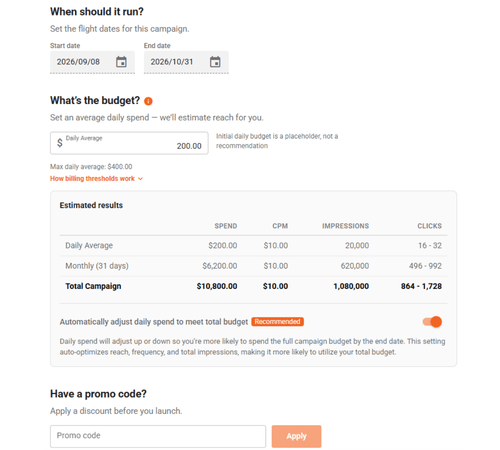
- If your flight dates are less than one month, the budget data will display in amounts correlating with the total campaign, but if the flight dates are longer than one month, the budget data will display monthly average information.
- Double check your dates:
- Making sure you have the desired day, month, and year is import, and a good idea to always double check.
- Automatic adjustment of daily spend to meet total budget:
- Daily spend will adjust up or down so you’re more likely to spend the full campaign budget by the end date. This setting auto-optimizes reach, frequency, and total impressions, making it more likely to utilize your total budget and is our recommendation. However, you can toggle this to only focus on spending your selected daily spend each day.
Tips for Budgeting
- Reach and Frequency:
-
- An effective advertising campaign has a healthy balance of reach (the number of individuals) and frequency (the number of times your ad is delivered to one individual on average). You want to estimate how many people are entering a geofence each month and how many times you want to reach them by adjusting your daily budget and, in conjunction, your impression count.
- One person has 2.5 devices:
- Americans own an average of 2.5 devices that can be served geofencing ads. Keep this in mind when working through reach, frequency, and budget.
- Update your budgets:
- You can update your budget at anytime and scaling them up and down based on desired exposure and your comfort level.
- Impressions > Clicks:
- We share impression and click estimates on display ads, but with display ads, the impressions are often more valuable collectively than the clicks. Display ads, on average, receive a 0.05%-0.08% CTR (Click through Rate: Qujam tends to be above this regularly). This means that, on average, over 99.9% of the time, when a display ad is served to someone they don't click on it. However, that doesn't mean it didn't work. Impressions provide brand awareness, drive search and foot traffic, and leave an impression with your target audience. Yes, we want people to click, but we really want to get your message in front of the right people at the right time. This ensures they take action including clicking the ad, going to your location, searching online, talking to a friend about your company, etc.... Having a healthy estimated impression and click number is important to the success of a campaign.
- Budgeting is a bit of science and art, so if you feel stuck ask us:
- Use the contact form below to reach out and include the name of your campaign if you already setup the draft or write out the details of your campaigns, and one of our geofencing experts will give you a budget recommendation. For more information about choosing your daily spend on Qujam Geofence Advertising campaigns we also wrote this blog in September 2023.


