


Conversion tracking is not optional in digital advertising. It is the backbone of knowing what works. A click or a geofenced impression on its own does not create value. You need to see the downstream result and connect it back to the ad that sparked the action. That result might be a form fill, a purchase, a call, a key page view, or a visit to a physical store. When you can measure those outcomes, clicks and impressions turn into real ROI.
Geofence campaigns add an extra layer. You are measuring online activity and real-world behavior. People see an ad in a place, then move through the world and take action later. Precision in tracking is what makes that story visible.
Set up accurate tracking from exposure to outcome. Do this and you can optimize spend, shift budget with confidence, and grow sales more reliably. This post walks through how to track conversions for a geofencing campaign. We cover online and physical conversion tactics, how they differ, and how to blend them into one picture.
Digital Conversions vs Physical Conversions
Digital Conversion Defined
A digital conversion is any desired online action a visitor takes after interacting with an ad. Examples include submitting a form, downloading a white paper, making an online purchase, clicking to call, or subscribing to a newsletter. These actions happen on your site or app, or through other digital touchpoints.
Physical Conversion Defined
A physical conversion is an in-person action that follows ad exposure. In a geofence campaign with Qujam, this means a user saw your ad, then later entered a defined conversion zone such as your store, booth, or clinic. Entry into that zone is logged as a conversion.
Micro conversions are the smaller steps that show movement toward your main goal. Think “Learn More” clicks, video views, brochure downloads, or adding to cart without checkout.
Macro conversions are the primary business outcomes. Think completed purchases, qualified lead submissions, booked appointments, or verified store visits.
The Basics of Conversion Tracking
Why Geofencing Adds Complexity
In many digital campaigns the path is a click to a landing page and navigation to an online conversion of some kind, which pixels help track. The technology that supported the tracking of that user from start to finish is all digital. On the other hand, geofencing ties ad delivery to a user’s location through GPS and similar signals which is a non-digital event. The technology hat allows the ad campaign to target a person with an ad can track physical conversion to a location, but the encrypted digital footprint and use of non-digital tracking means there’s a misalignment in the ability to properly track conversion online for a geofencing ad. So with geofence advertising, one of your key trackable outcomes from the Qujam platform is a store visit, not a site action. Because of this, geofencing campaigns can be difficult to track online conversions for and calls for extra mechanisms and a slightly different attribution lens.
How Tracking Connects Ad Engagement to Website Behavior
For online conversions, the chain is simple. The user clicks an ad, lands on a page, and completes an action. You connect these dots with cookies, pixels or tags, URL parameters such as UTMs, and your analytics platform.
Role of Cookies, Pixels, and URL Parameters
- Cookies keep session and user context so you can attribute actions to the original source. (Scaleo). Qujam and geofences use a cookieless environment and therefore do not leverage cookie based targeting nor conversion.
- Pixels or tags are small code snippets that fire on page load or on specific actions. They enable conversion tracking, remarketing, and attribution. (Improvado) Due to the encrypted nature of geofence collected devices, pixels and tags are not leverage for conversions either.
- URL parameters like UTMs attach campaign data to the incoming visit. For example, utm_source=qujam&utm_medium=geofence&utm_campaign=fall_home_show. In GA4 you can segment by session source, medium, and campaign to view performance. (HubSpot). We highly recommend the use of UTMs for geofencing campaigns. However when using GA4 data you may notice some differences between any programmatic advertising data and GA4 data. For a full article on this subject, please click here.
How Qujam, Google Ads, and Meta Measure Conversions Differ
- Google Ads and Meta primarily measure click-based and view-through events using pixels and platform tags. These link the ad interaction to an online action. (Meta Developers). However, Google Ads and Meta cannot do true geofence targeting to a specific property address nor polygonal shape.
- Qujam focuses on location outcomes. Your conversion can be a verified visit to a defined place after ad exposure. Measurement relies on GPS relationships and conversion zones, not cookies that follow the user through your site.
The takeaway. Use both online tracking for on-site actions for non-geofencing advertising and UTMs and offline tracking for visits for geofence advertising campaigns. We additionally recommend to review the following data point to try to collect the entire picture; sales, overall website traffic, leads, contacts, closing rates, search traffic, etc…
Tracking Tactics and Tools
A. UTM Parameters (Tracking by URL)
What UTMs Are and How They Work
UTM parameters are tags you append to URLs to capture campaign details such as source, medium, campaign, content, and term. This lets analytics tools attribute sessions and conversions to the right campaign. (Wikipedia).
Key Parameters
- utm_source: where traffic came from. Example: qujam
- utm_medium: the channel. Example: geofence or display
- utm_campaign: the specific campaign. Example: fall_home_show
- utm_content and utm_term: optional fields to identify creative variations or keywords
How to Build and Manage UTMs
Pick a standard naming convention. Keep everything lowercase. Avoid spaces. Choose either hyphens or underscores and be consistent. Maintain a simple spreadsheet so the team can reuse the same values and avoid fragmentation.
Applying to Qujam
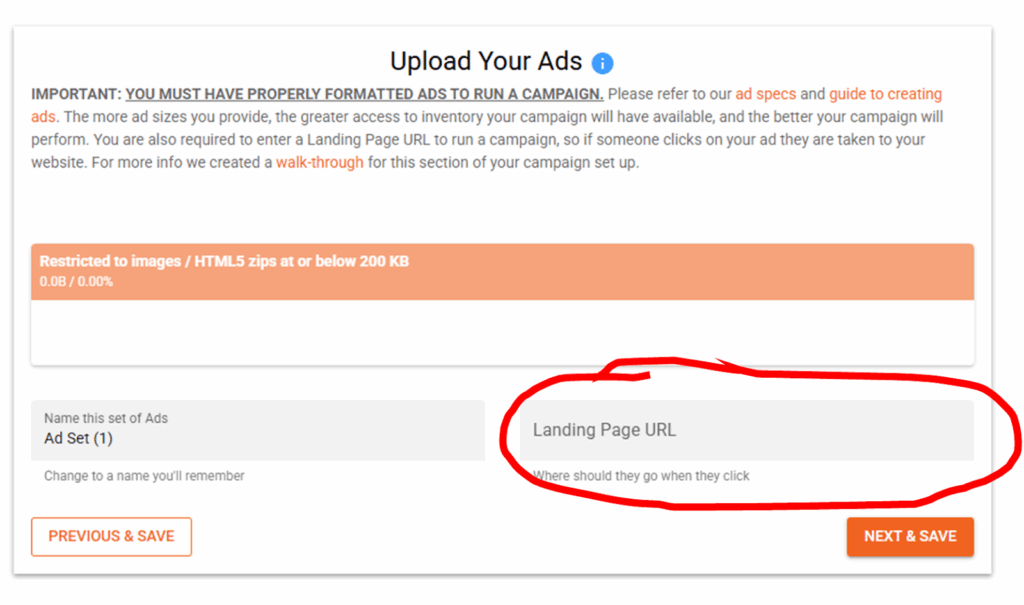
Paste your landing page with UTMs into the Qujam ad upload screen. Example:
https://yourwebsite.com/landing-page?utm_source=qujam&utm_medium=geofence&utm_campaign=fall_home_show
Benefits
UTMs make it easier to segment results in GA4, HubSpot, and similar tools. You can compare conversion rates by source, medium, campaign, ad, and audience. (OWOX)
Reading Results in Analytics
In GA4, use Traffic Acquisition or User Acquisition and filter by Session source, medium, or campaign to see sessions, engagement, and conversions for your Qujam traffic. (AgencyAnalytics).
B. Dedicated Landing Pages
Why Use Unique URLs
Unique pages or at least unique parameters help isolate traffic and conversions by campaign or audience. You can compare geofenced audiences and creative more cleanly. Additionally, optimizing a landing page to align with your ads’ look, message, and offer is one of the most effective optimizations one can do for a digital campaign. (Adobe)
Using Page Traffic as a Proxy
If macro conversions take time, early signals matter. Landing page visits, scroll depth, and button clicks can indicate whether an audience is responding, even before purchases or store visits show up.
Dynamic Parameters vs Dedicated Pages
Use dynamic UTMs if you are sending to a shared page but want clean attribution. Use dedicated landing pages if the message, offer, or form should be tailored to a specific audience.
Example: /promo/spring-festival versus /promo/summer-deals.
C. Conversion Pixels and Tags
Non Geofencing Standard Conversion Installation and Pixels Measure
Google Ads, Meta, and similar platforms use pixels or tags you place on your site or deploy through Google Tag Manager. Configure events such as purchase, lead submit, or add to cart.
Pixels measure post-click behavior and tie conversions back to ad exposure. They also power optimization inside the ad platform. For these forms of advertising,one should test tags with Tag Assistant or Pixel Helper. Confirm events fire on the right pages. Align consent and privacy controls with your legal requirements and your users’ expectations.
How This Differs From Qujam
Geofence advertising does not use tracking pixels to measure physical conversions. Physical visits are recorded using GPS and defined conversion zones and therefore the technology is not effective at online conversion tracking from within the system.
D. Call Tracking and Offline Conversions
Use dynamic number insertion (DNI) or unique call-tracking numbers on your website so you can connect calls to campaigns. This is mainly useful on dedicated landing pages, video ads, and audio ads (coming in 2026). Having a phone number on a display ad is not best practice, but possible if desired as well.
Offline conversions such as in-store sales can be uploaded to analytics tools like GA4 using Measurement Protocol, letting you close the loop between ad exposure and real-world action (MeasureSchool).
E. Google Analytics 4 (GA4) Integration
Cross-Device, Event-Based Model
GA4 treats almost everything as an event. With proper setup, you can see how users move across devices and sessions.(Google Support). This can cause differences in programmatic front end ad data and what’s in GA4. For a full article on this subject, please click here.
Set Up Conversion Events
Mark the events that matter as key events. Examples include form_submit, generate_lead, purchase, or a custom event on a thank-you page.
What GA4 Shows for Qujam Campaigns
GA4 captures the online portion. It tracks ad clicks to landing pages to form submits or purchases. GA4 does not automatically record physical store visits from a geofence campaign. To see physical outcomes alongside web behavior, bring Qujam’s conversion zone data into the same reporting view or import offline events where appropriate.
F. Conversion Zones and Geofencing (Qujam-Specific)
How Qujam Measures Real-World Actions
Define a conversion zone around a location(s) such as a storefront, campus, or booth. When a user who saw your ad later enters that zone, Qujam logs a physical conversion. This connects ad exposure to foot traffic.
Example
A prospect sees your ad while attending a local home show. Two days later they stop by your showroom. When they cross into your conversion zone, that visit is recorded and attributed to your campaign.
Why Blend Online and Offline
Layer online events like clicks and form submits with verified visits. You get a fuller story, better CPA math, and clearer optimization decisions by zone, audience, and creative.
G. Third-Party Website Tracking Resources
IP Tracking for B2B
Tools that identify visiting companies by IP can help B2B teams score interest after a geofenced impression. Treat this as a micro conversion and route high-fit accounts to sales.
Heatmaps and Session Recordings
Tools like Log Rocket or Microsoft Clarity show where users click, scroll, and stall. These insights help you remove friction and lift conversion rates on your landing pages.
Opt-In Site Retargeted Tacking and Contact Info
You can also use platforms that takes known opt-in data from multiple resources and pairs it with your website traffic via a pixel to get name, contact info, and demographic data of individuals that have been to your website and where they are coming from. This can cost about $500-$10,000 per month depending on you traffic volume, but a good resource we found in this space is Savvy Data. They won’t provide info on all users, but over 50% of Americans tend to have opted in to something that allows their data to be shared.
H. Elevated Budgets for Conversion Campaigns
IP Tracking for B2B
Conversion based goals generally produce better results with a higher budget to optimize effectively compared to awareness campaigns. That’s because more money = more impressions, which provides greater data to see which domains, geofences, and ads are performing better than others. A recommendation we make at Qujam is for conversion based campaigns to spend a minimum of $1,000 per month to generate enough data.
Putting It All Together: Your Tracking Strategy
Define Goals Per Campaign
Write the target in plain language. Examples. “Generate 30 qualified leads from the geofence campaign in Q4.” “Drive 150 verified store visits to Location A within 60 days.” “Acquire 100 purchases at a CPA under 60 dollars.”
Combine Methods for Layered Insight
Use UTMs for every landing page link. Use dedicated pages when the message or audience is unique. Use Qujam conversion zones for store visits. Add call tracking if phones matter. Consider CRM and POS uploads to close the loop.
Unify Data in One View
Pull in ad data, web analytics, conversion zone visits, sales, leads, closing ratio, and CRM or POS outcomes to review multiple data points. With everything in one place you can calculate cost per lead, cost per visit, and cost per sale, compare data to past time periods, and assess the effects of the campaign.
Optimize Against Real KPIs
Once tracking is cleaner, optimize to the metric that matters for the campaign. That might be qualified leads, booked appointments, verified visits, or revenue. Test creative, offers, and zones, then reallocate budget based on what the data shows.
Common Pitfalls to Avoid
- Inconsistent UTM naming. Mixed case or ad-hoc labels fragment data. Pick a standard and stick to it. (University of Minnesota Marketing Communications)
- Single-source reporting. Click data alone misses physical outcomes. Physical visits alone miss web behavior. Blend sources.
- Privacy gaps. Get consent where required. Honor regional laws and your own policies.
- Attribution blind spots. Expect lag between exposure and visit. Account for cross-device behavior and cookie loss. Set realistic attribution windows.
Conversion tracking turns your plan into a system you can manage. It is a mix of setup and judgment. An art and a science. You define the goals, tag the journey, and read the signals with care. No channel works in isolation, and every touchpoint helps the next one succeed.
There is no conversion tracking that is 100% accurate and clear. We know that it’s frustrating, but Qujam is dedicated to help you connect online engagement with real-world outcomes though in platform solutions, research articles (like this one), and human accessibility. You will see store visits, foot traffic, and location lift that standard tools cannot provide on their own, but we hope this article helps explain and arm you with some resources to assist you in online conversion tracking for geofence advertising campaigns.
If you have additional questions or would like some help setting up physical conversion tracking for your next geofence campaign. Schedule a Qujam demo or check out our page on conversion zones for more info and video walkthrough.
Thank you for your interest in Qujam: Geofence Advertising for All. Happy geofencing!


